Importing Excel Sheets
I have written as a separate procedure, please copy code and call the procedure (Excel Usage).
Explanation
-
On Error Clause: If an error occurs during execution, the Visual Basic for Applications (VBA) **Interpreter** will transfer control to the **error handler** labeled **
errHandler:** (note the required colon notation). - Workbook Declaration: Two workbooks are declared: one for the **existing or target workbook** and the other for the **source workbook** (the file from which data will be copied).
- Target Workbook Sheet Check: The code includes a check to ensure the **target workbook** has at least **two worksheets**, as the data copying operation is designed to begin *after* the second worksheet.
-
Application.GetOpenFileName: This method is used to prompt the user to select the **name(s) of the file(s)** that need to be imported into the current (target) workbook.
- The file dialog allows the user to select **one or more files**.
- If the **Cancel button** is operated upon (clicked), the interpreter will pass control to the **error handler** (e.g., `errHandler:`), which is then responsible for displaying a relevant message to the user.
Rest of the code is self explanatory - a process of copying sheets from source work book to the current work book after second work sheet in target sheet.
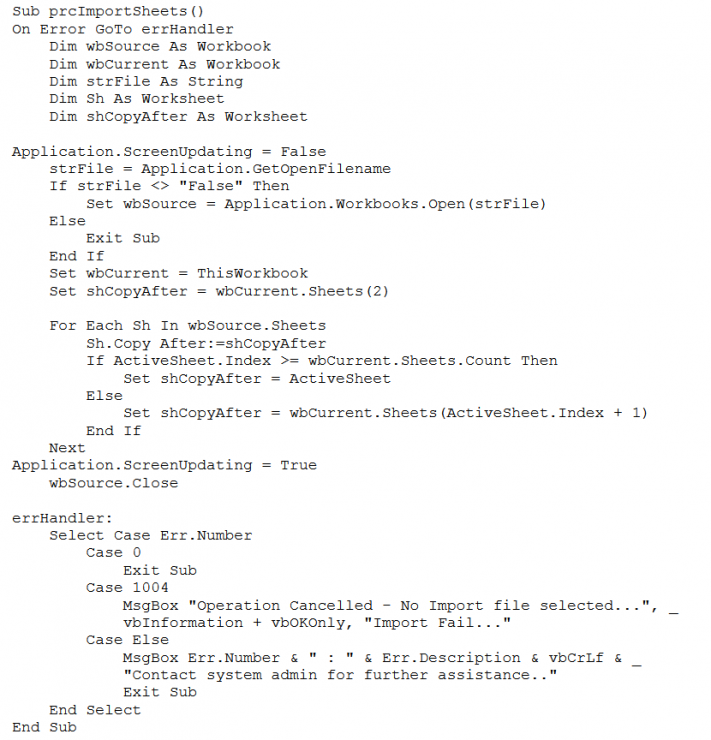
Sample Code: