Henry Gantt Chart
Gantt Chart, is named after Henry Gantt. This graph is used to display activities or
programs as a part of time. Each is shown on a horizontal bar (generally). Each bar or
activity has a specific start date and end date. Considering the complete can display the time
intervals by which each activity would be completed.
In simple terms:
- What: methods to divide a full-scale programme into significant parts
- Why: a tool to depict probable dates of completion of a task
- When: in project management or activity/event management
What Gantt Chart does:
- Number of steps in course of completion of Project
- Various stages of a Project
- Different steps involved at each stage of the Project
- Start date and end date for each step in the Project work flow
- Days required for completion of each step
- Time consumption from start of the Project to the end
- People involved and their respective responsibilities
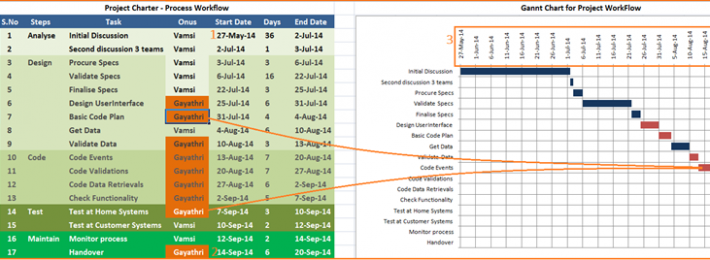
Follow the following Procedure, following the above picture:
- Start typing start date and end date for each step
- Insert additional rows if required at each step
- Insert additional steps if required.
- You can observe the chart being filled automatically.
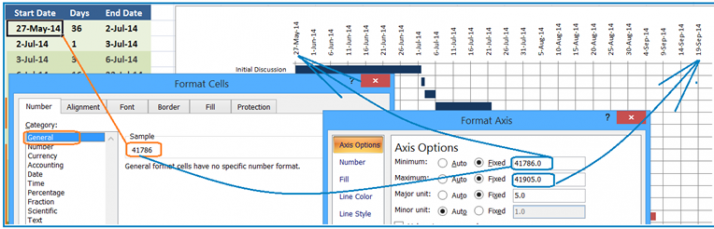
To adjust dates with the dates displayed in the graph, follow the picture displayed above:
- Right Click Mouse by placing cell pointer in the start date of the project (point 1 in the first figure) Format Cells dialog box is displayed
- by default you can see text displayed in Date format - Move to General Column - Number with respect to the date is displayed.
- Right Click Mouse by placing the mouse on the X-Axis of the graph (point 3 in first figure) Format Axis dialog box is displayed.
- Type the number (eg: 41786) at the Minimum value.
- Likewise, repeat the above steps for the end date (point 2 in first figure) of the project as well.
- Dates on the graph will automatically get adjusted as per the sheet data.