Get last_row / cell_address
The following code can be placed in any Excel file Code Window (to get Code window, Press Alt + F11) if the Code window is password protected, then it will display a Dialog box to enter password, else, it takes you to code window.
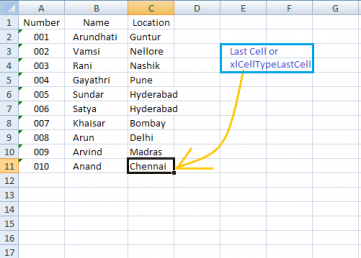
Row returns LONG value e.g., 104578 (to acccomodate Excel 2007 rows) and ActiveCell. Address returns STRING value e.g., $K$125
Sample Code
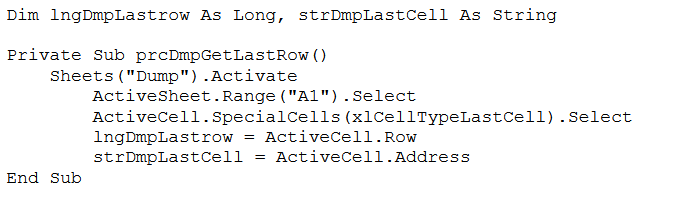
Follow the following Procedure:
- To open the Visual Basic Editor (VBE) (the code window), press Alt + F11.
- Copy and paste the code into a Code Window (usually a Module).
- Set a Breakpoint: Place the cursor on the line starting with Private Sub and press F9. (This places a red circle/dot in the margin).
- Run to Breakpoint: Press F5 to compile and run the procedure. A yellow strip will appear on the `Private Sub` line, indicating execution is paused.
- Step Through Code: Constantly but slowly press the F8 key. Observe the yellow bar moving to execute each line of code individually (this is called "stepping").
- Inspect Variables (Immediate Window): When the yellow line reaches the End Sub line (or any point after the variables have been assigned a value):
- Go to the Immediate Window (Press Ctrl + G).
- To display the last row number, type:
? lngDmpLastrow - To display the last cell address, type:
? strDmpLastCell
Try using sheet name as Variable, so that it may work in any given sheet.