Introduction to VBA
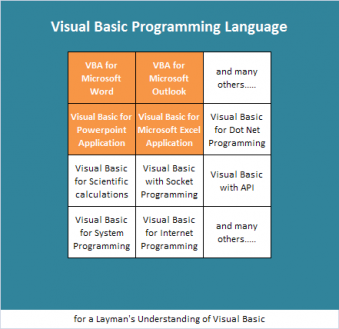
VBA (Visual Basic for Applications) is a subset of Visual Basic Programming Language. As the name suggests, those functions that are necessary for an application (like Microsoft Word or Microsoft Excel) are aleniated from Visual Basic Language, and grouped under the title Visual Basic for Applications.
Hence VBA for Microsoft Word differs from VBA for Microsoft Excel, and VBA for Excel differs from VBA for Outlook and likewise with VBA for Ms. Access.
Donot get confused with VB script and VBA as generally addressed
VB Script is a language like Java Script which is dominantly used for internet programming and runs in browser, whereas VBA runs from its own application. i.e., VBA code for Excel runs from Excel, VBA code for Ms.Word runs from Ms.Word, VBA code for Access runs from Ms.Access etc.
The general language constructs of Visual Basic remain the same. For example: IF condition looks the same, and retains the same functionality. Likewise with looping structures: FOR loop looks the same as in Visual Basic Language.
Meaning: for people who are familiar with Visual Basic Language, VBA looks fairly simple, but at the same time, it is different as well. Which does not necessarily mean that one should know Visual Basic before learning VBA.
How VBA Works..?
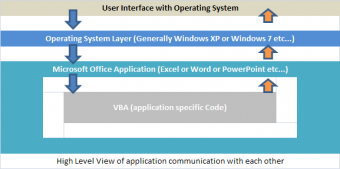
VBA code can be generated either by recording (usually called macro) or by writing code. However, to edit (make changes) to the code, Microsoft provides VBE (Visual Basic Editor), a workspace where code is written either by application or by user.
VBE is another topic; we shall consider it in Event Driven Programming Model. To check how editor looks like, press ALT + F11.
How, a Macro - different from VBA..?
Macro is dominantly used for linear actions, whereas VBA is used for taking decisions or repeating the same actions any number of times.
For Macro, a better example is formatting a spread sheet. For example:
- Heading is to be centered
- Cells are to be merged
- Text should be left-aligned
- Number column should be formatted to two decimal places
- Date column should be formatted appropriately
- Then start recording the macro
Start recording macro and perform each operation in sequence. Do not repeat the same action, because when the macro is run, the same action will be repeated twice. For VBA programming follow the Looping Structures with VBA Code link.
What is Macro Recording...?
To keep it very simple, it is "recording user actions". It may be keyboard activity or menu activity. Application generates background code for each operation and stores it in a module. This code can be viewed by pressing Alt + F11.
There can be any number of macros in a spread sheet. Each macro can be assigned with a short cut key (from keyboard eg: Ctrl + W). This helps to run directly from spreadsheet, instead of running desired macro from VBE.
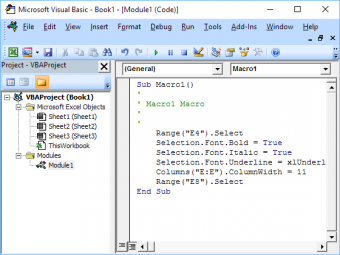
Screen is displayed for reference which shows application generated code for a simple activity as listed below:
- Select "Record Macro" from Developer tool bar (menu bar / ribbon)
- Place any text on any of the cells in the Spreadsheet
- Press Ctrl + B
- Press Ctrl + I
- Press Ctrl + U
- Press Stop Macro Button
- Press Alt + F11
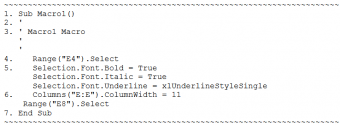
The above code looks fairly simple. We will try to understand what it means:
- SUB: Indicates that a procedure starts from here. Macro1 is the name of the procedure, which is a system-generated name.
- Single quote ('): Used to comment the text. The code that follows a single quote mark anywhere in the program will not be executed.
- Same as point 2. The system placed a comment for a reference with the macro name Macro1.
- Range("E4").Select: Range is a group of cells and line 4 instructs to select cell E4.
- Formatting Changes: After the required cell is selected: Bold, Italic, and Underline are applied.
- Column Formatting: Select the entire column E and set its width to 11.
- END SUB: Used to end the procedure.
Conclusion
The following are some points to compare and contrast VBA with Macro:
- VBA is a subset of Visual Basic Language
- VBA is local to the current application.
- VBA for Ms.Excel is different from that of Ms.Word or Ms.Access
- Enable Developer menu option to avail recording options.
- Macro is a program written by the application itself.
- Application written program is extensive, hence you can edit unnecessary code.
- Conditions can not be written with application generated code (macro).
- Instead, we can have one recording for each condition.
- Loops can not be written with application generated (macro-recording)
- In Excel 2003 and before versions, .xls files include code.
- Frequently used file types: .xls, .xlt, .xla, .xlb
- In Excel 2007 and later versions, .xlsm files should have code
- Frequently used file types: .xlsx, .xlsm, .xlst, .xlsa, .xlsb
- Please note: from 2007 and later versions, file extension is of 4 characters.
God Bless you.