Procedure - dictionary meaning
- is pronounced as pro-cee-jar:
Generic meaning:
a series of actions that are done in a certain way or order:
an established or accepted way of doing something
Computer parellance:
a set of instructions for a computer that has a name by which it can be called into action.
The only difference between a PROCEDURE and a FUNCTION is that, a Procedure doesnot return a value,
where as a Function returns a value, in some languages, a Function may return more than one value.
Procedure or Function or Routine are mostly used interchangably.
Function - dictionary meaning
- is pronounced as func-tionGeneric meaning: the special purpose or activity for which a thing exists or is used job or duty of a person a large ceremony or social event
Computer parellance: a computer subroutine: specifically: the one that performs a calculation with variables provided by a program and supplies the program with a single result.
Now let us consider the five basic questions What, Why, When, How
- What: A **Procedure** is a part of a program that performs a specified activity.
- Why: Procedures are used to **simplify a program**, which, in turn, reduces the total number of lines of code.
- When: We use a procedure when the **same activity is performed more than once** in the program.
- How: Procedures are created by **separating those lines of code** that perform the activity and **giving them a separate name**.
Every Programme starts with a PROCEDURE and many times ends with the SAME PROCEDURE. For that matter, every program is a procedure or collection of procedures.
In VBA, Procedure looks like the following examples:
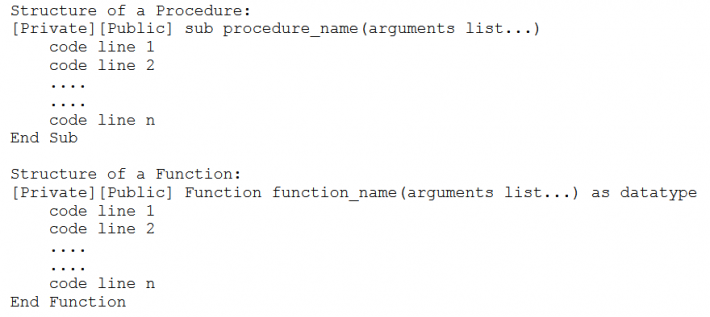
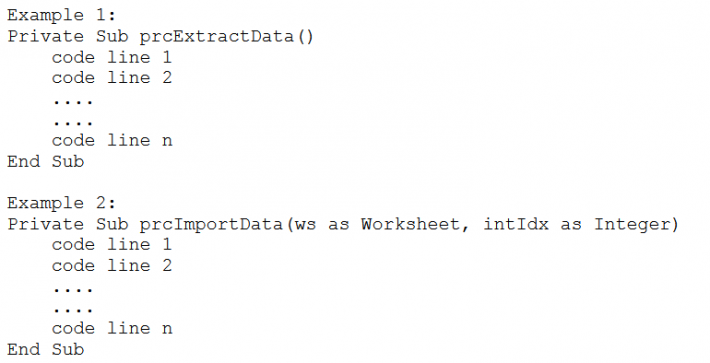
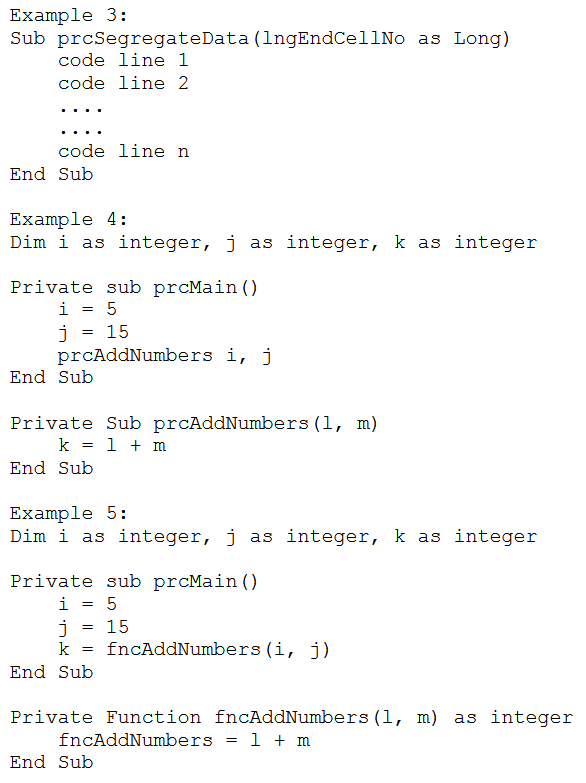
Explanation for the given examples
- Example 01: This example, does not take any input nor return any value. It just does the given task (which is included between 'Private Sub' and 'End Sub'
- Example 02: This example, does takes two input variables but does not return any value. It just does the given task (which is included between 'Private Sub' and 'End Sub'
- Example 03: This example, does not contain key word 'Private'. It takes one input variable but does not return any value. It just does the given task between 'Sub' and 'End Sub'
- Example 04: In this example - i, j and k are called Global Variables. Initially, they are stored with 'zero' value. Procedure prcMain initialises i with 5, j with 15 and calls prcAddNumber procedure. This second procedure adds given input and stores the value in variable k. Procedure 'prcAddNumber' starts with 'prcMain' and ends with 'prcMain'
- Please Note: Function has a return type in declaration. Structure: Private Function fncCalDifference(a as integer, b as integer) as integer
- Example 05: Functions and Procedures can be used together in the same program. ie., Function can be used in another Function or a Procedure can be used in a Functon or a Procedure can be used in a Procedure or a Function can be used in another Procedure
All the content that you learn here will not be of any use, until you practice, so I urge you to practice.
As and when you practice, you get more doubts as to how to go ahead, these doubts strengthen your knowledge and lead you to experience. These will be helpful in day-to-day activities.
Sample code to format sheet
Sub prcFormatSheet()
    Application.StatusBar = "Formatting sheet..."
    Cells.Select
    With Selection.Font
        .Name = "Calibri"
        .Size = 10
    End With
    Selection.RowHeight = 20.25
    With Selection
        .VerticalAlignment = xlCenter
        .ColumnWidth = 8.57
    End With

    Rows("1:1").RowHeight = 40.5
    Rows("1:1").Select
    With Selection
        .VerticalAlignment = xlCenter
        .WrapText = True
    End With
End Sub
Points to Note:
- Procedures are declared using either Sub or Private Sub, reflecting the Scope declaration context (PUBLIC or PRIVATE).
- A procedure declaration must always end with End Sub.
- If a Sub is changed to Function, the Visual Basic Editor automatically updates End Sub to End Function.
- Functions are declared using Function or Private Function and must end with End Function.
- It is customary, though not mandatory, to use the prefix prc for procedures (Sub) and fnc for functions, to aid in distinguishing them from each other and from system-defined routines.
- Procedure and function names should be meaningful, clearly indicating their purpose.
- If arguments are required, the arguments list (enclosed in angular braces $\langle \text{arguments list} \rangle$) must be included in the declaration, with individual arguments separated by commas.
Thank you for your time. God Bless you.